Regretfully, I am no longer actively developing BeOS software. If anyone is interested in obtaining rights to the source code for any of my BeOS programs, contact me. The BeOS pages on this site are archival in nature.
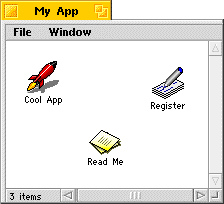
It's easy, just open the Register application! The author of the software you have obtained has provided a Register application as an easy way for you to pay registration fees and register yourself as a user. When the package is unpacked or otherwise installed on your BeOS computer, you will see a window something like this:
Of course, the first thing you do is open the application and ignore the Read Me file. But afterwards, the author may have included some special instructions concerning the Register application in a Read Me file, or whatever other documentation is provided. But if not, you can still just open the Register application, and it will step you through the information required to successfully register your software.
The Kagi registration service allows you to decide how to send in your payment. Choose from these possibilities:
- Send cash.
- Send cash in non-US currencies.
- Write a check and mail it.
- Use a credit card and fax your order directly.
- Use a credit card and e-mail the info.
- Use your First Virtual account.
You will be prompted by the Register application to choose a payment method, and then later asked to pick how you want to send it in. Register goes slow, a step at a time, and you don't have to worry about accidentally sending a credit card number over the net if you don't want to. In fact, a preview of the information that will be sent to Kagi is provided before you are asked for how you want to send the payment. When choosing Cash in non-US currencies, the exchange rate calculation is taken care of for you, rounding up to the nearest paper denomination. When you provide a credit card number it is scrambled so that it is not easily stolen if intercepted. If that's not enough, you can always use more traditional ways of sending payments, the mail service or fax machine.
If you've come to this page just to find out what Kagi Register on BeOS looks like, the overview page shows you most of the interface, and adds some comments about the user's interaction with it.
Here are some links which may be appropriate if you still have questions about using the Register application: